By Jagane Sundar and Nikhil Koduri
At OXMIQ Labs, we develop AI technologies all the way from GPU hardware to Model Orchestration software.
Running 70B, 120B, or even larger language models locally requires serious hardware. Cloud inference works for prototyping, but for production workloads, sensitive data, or simply avoiding per-token costs, you need local GPU power.
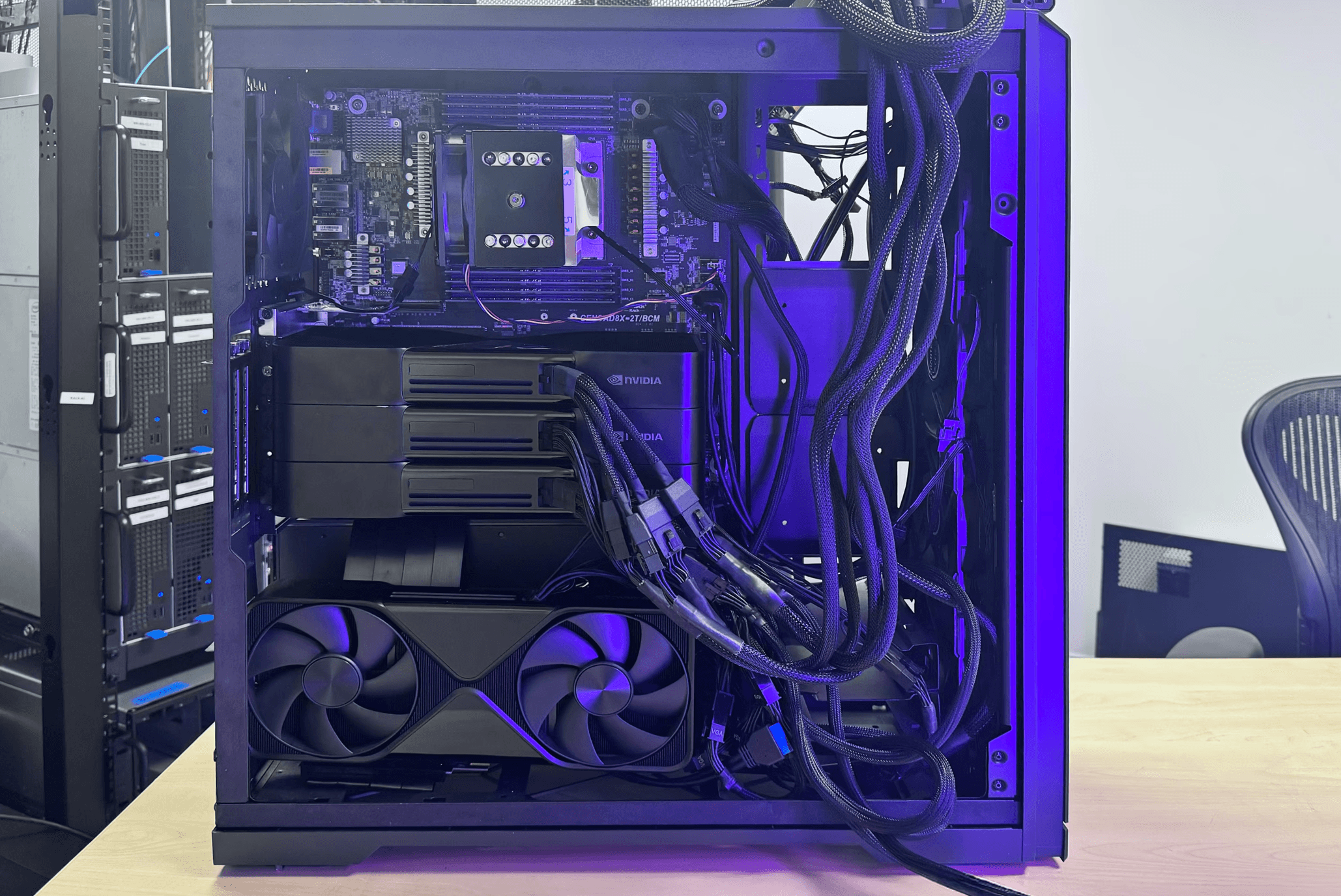
In this post, we'll show you how to build a single workstation with four NVIDIA RTX 6000 Blackwell GPUs: 384 GB of total VRAM and over 500 TFLOPs of FP32 compute. NCCL supports two PCIe GPUs for peer-to-peer communication in a single process, so we split the four GPUs across containers and orchestrated with Ray.
The RTX 6000 Blackwell advantage
The RTX 6000 Blackwell Workstation Edition is NVIDIA's flagship professional GPU, and four of them in a single system deliver remarkable capabilities:
| FP32 Compute | ~500 TFLOPs |
| Total VRAM | 384 GB (96 GB per card) |
| Memory Bandwidth | ~960 GB/s per card |
| FP4 AI Performance | 1000+ TOPS per card |
| Interconnect | PCIe 5.0 (128 GB/s per card) |
This is enough memory to run a 120B parameter model in FP16, or significantly larger models with quantization. The Blackwell architecture's FP4 capabilities make it particularly well-suited for quantized inference workloads.
The hardware
Our Quad Blackwell Build:
- Motherboard: ASRock Rack GENOAD8X-2T/BCM
- CPU: AMD EPYC 9354 32-Core Processor
- Cooler: Silverstone Technology XE04-SP5
- RAM: 256 GB ECC Registered DDR5 4800
- PSUs: 2× 1600W PSUs
- GPUs: 4× NVIDIA RTX 6000 PRO Blackwell Workstation Edition
- PC Case: Phanteks Enthoo Pro 2 Full Tower
- Estimated Total: ~$38,200
Hardware challenges
Challenge #1: Power requirements
Each RTX 6000 Blackwell draws up to 350W under load. With four cards, that's 1400W for the GPUs alone before accounting for the AMD EPYC CPU (300W TDP), memory, storage, and cooling fans. Peak system draw can easily exceed 2000W.
We used a dual PSU configuration: two standard 1600W units connected with a Dual PSU Multiple Power Supply Adapter (ATX 24-pin to Molex 4-pin). This adapter synchronizes the start signal between PSUs so they power on together.
Challenge #2: PCIe instability
Having 4 RTX 6000 Pro Blackwells caused frequent hangs and boot issues. What finally fixed everything was forcing each slot to run on PCIe Gen4 instead of Gen5. The Blackwells have PCIe instability issues, and using server-class motherboards also comes with their own quirks.
Challenge #3: Physical fitting
We used the Phanteks Enthoo Pro 2 Full Tower with vertical mounting for one GPU and a PCIe riser cable for the final card, enabling all four cards in one box.
The software design: NCCL's peer-to-peer scope
NVIDIA's NCCL (NVIDIA Collective Communications Library) supports two PCIe NVIDIA GPUs for peer-to-peer communication in a single process. Initializing four GPUs in a single container falls outside that scope and leads to errors or degraded performance.
The configuration: containerized GPU isolation
We split the GPUs across multiple Docker containers, with each container seeing at most two GPUs. We then use Ray to orchestrate distributed inference across containers, with NCCL communicating over TCP sockets instead of PCIe peer-to-peer.
Step 1 — Configure NCCL
Create a file called nccl.conf:
NCCL_NET=Socket
NCCL_SOCKET_FAMILY=AF_INET
NCCL_IB_DISABLE=1
Step 2 — Launch the head container (GPUs 0 & 1)
docker run -it --rm \
  --gpus '"device=0,1"' \
  -p 8265:8265 -p 8000:8000 \
  --ipc=host --ulimit memlock=-1 \
  --shm-size=10.24gb \
  -v ./nccl.conf:/etc/nccl.conf \
  -v /opt/models:/opt/models \
  --entrypoint /bin/bash \
  nvcr.io/nvidia/vllm:25.11-py3
Step 3 — Launch the worker container (GPUs 2 & 3)
docker run -it --rm \
  --gpus '"device=2,3"' \
  --ipc=host --ulimit memlock=-1 \
  --shm-size=10.24gb \
  -v ./nccl.conf:/etc/nccl.conf \
  -v /opt/models:/opt/models \
  --entrypoint /bin/bash \
  nvcr.io/nvidia/vllm:25.11-py3
Step 4 — Start vLLM
vllm serve /opt/models/your-model \
  --pipeline-parallel 2 \
  --tensor-parallel 2 \
  --trust-remote-code \
  --distributed-executor-backend ray
Step 5 — Test the endpoint
curl http://localhost:8000/v1/completions \
  -H "Content-Type: application/json" \
  -d '{
    "model": "your-model",
    "prompt": "The future of AI is",
    "max_tokens": 100
  }'
Capsule: our in-house GPU cloud
At OXMIQ Labs, we use OxCapsule to manage and share our GPU-enabled hardware across the team. Capsule functions as an in-house GPU cloud — we register all of our GPU systems and tag them with descriptive labels. When a developer needs access to specific hardware, they simply request it with a single command:
capsule launch Nvidia-RTX6000x4
This gives us the flexibility of cloud computing — on-demand access to powerful hardware — without the per-hour costs or data privacy concerns.